Beverage partner? Enroll a new account here →

For hotels, casinos, airports & resorts
A restaurant directory for your whole property.
Make dining on property the obvious choice. Put one QR code in the lobby, the rooms or the concourse. Guests find every restaurant, bar and café on site, each with a live menu that’s always up to date. No more reprinting the dining guide every time an outlet changes its hours.
What is a restaurant directory?
A restaurant directory from Just a Menu is one web page for every place to eat on your property. Guests open it with a QR code or link. They search by restaurant, dish or drink, see who’s open based on each restaurant’s hours and tap through to each live menu. No app, no login.
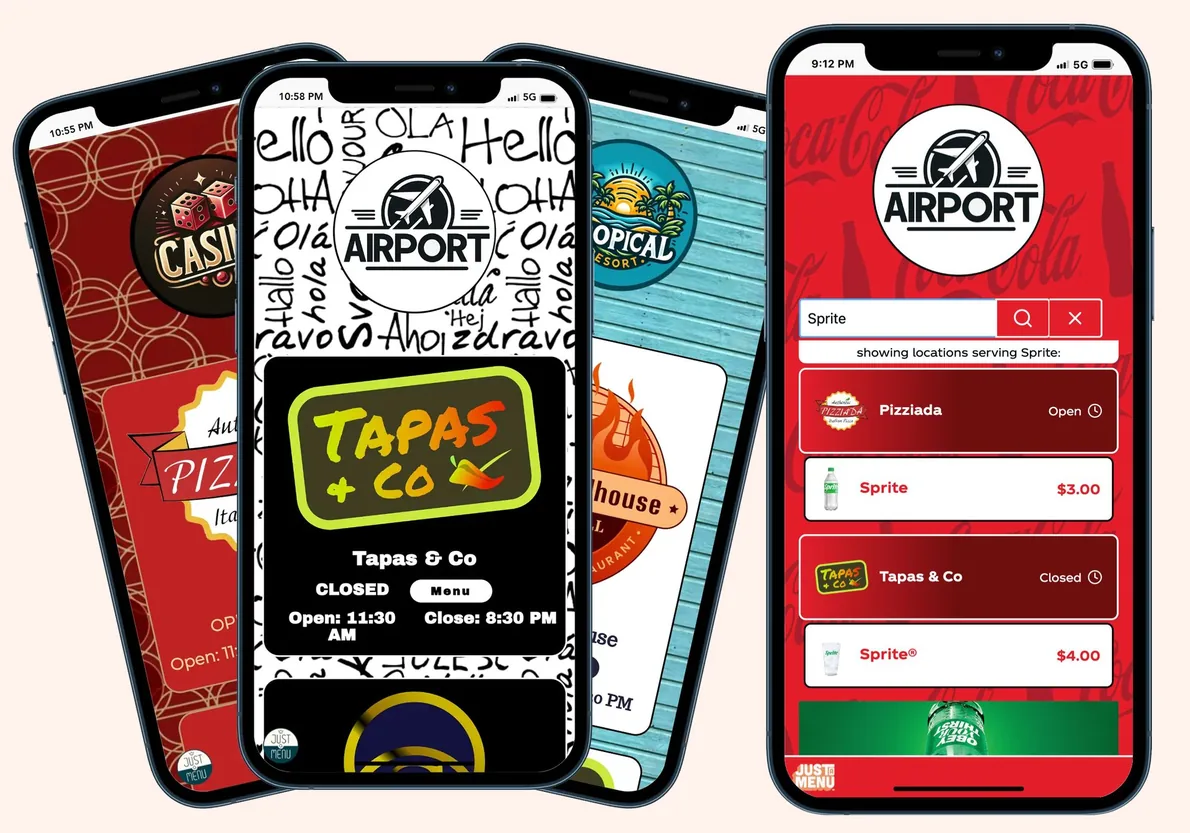
Your property’s own look
Search by food or drink
Sample directories
The old way vs. JAM
What’s open right now? That’s a call to the front desk.
On most properties, dining lives on a printed guide and a busy front desk. Every outlet keeps its own hours and its own menu, so the guide is wrong by the next change.
Finding a place to eat
Knowing what’s open
Menus and prices
New hours, new outlets
How it works
Set it up once. Share one code.
Your team builds the directory in Just a Menu. Guests just scan.
1
Add restaurants
In Directories, click Add Restaurants and pick your outlets, or those of tenants you’ve invited. Give each a description and a unit number like A‑101, and sort them into sections like floors or terminals.
2
Set the hours
For each day, choose Custom Hours, Open 24 Hours or Closed, with split shifts if you need them. Each restaurant keeps one set of hours, wherever it’s listed.
3
Make it yours
Start from a design or build your own, with your colors, fonts, logo and background. Show listings as a list or as logos. Add header art, a welcome image and sponsor posters between listings.
4
Activate and share
Activate the directory, then Download QR Code or Copy Link. Print the code on banners, signs and room cards. Put the link on your website or in guest emails. A shared link shows your name and logo.
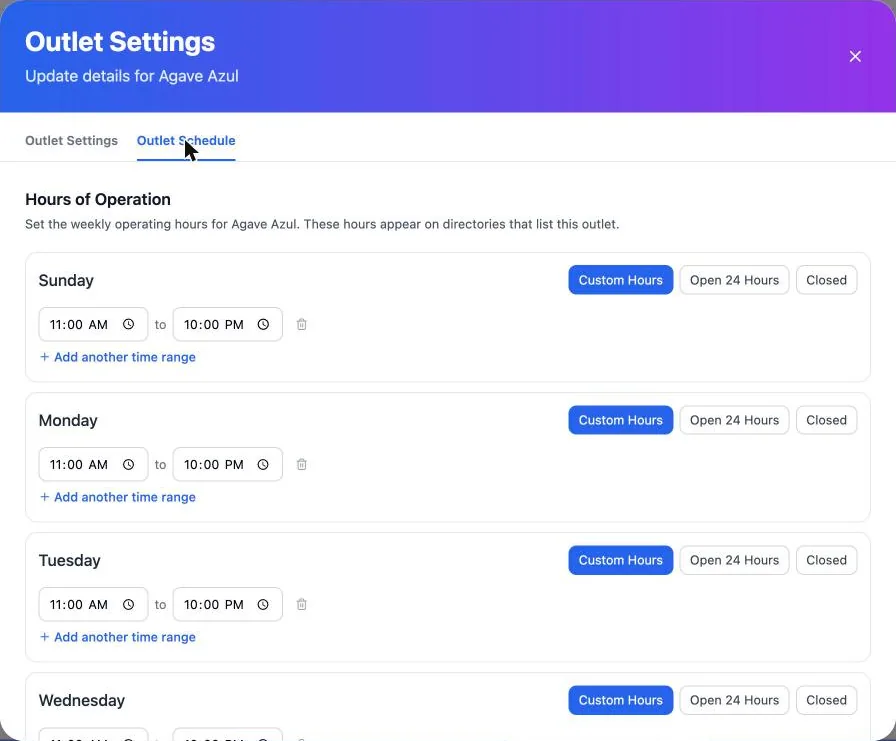
Real screen · sample menu
Hours and open now
Guests see who’s open before they walk over.
Each listing shows one status line, worked out from the restaurant’s hours in its own time zone. Seasonal outlets show when they reopen.
Open now · Closes 10:00 PM
A steakhouse on a Friday night
Open 24 hours
The café by the casino floor
Closed for the season · Opens May 1
A pool bar in January
In the app
Outlet Settings → Outlet Schedule → Custom Hours
Or, inside a directory: Edit Schedule
Who it’s for
Made for properties with many places to eat.
Hotels and resorts, casinos, airports and anywhere else guests choose where to eat. Here’s what each one gets from a dining directory.
Hotels & resorts
One code in every room, the lobby and the elevators. Guests see every restaurant, bar and café on property, with its hours and whether it’s open.
- ✓A seasonal pool bar says when it reopens
- ✓Your property’s colors, logo and a welcome image
- ✓Each menu in the guest’s language, where the restaurant turns it on
Casinos
From the steakhouse to the 24-hour café, every outlet on one code. Guests see who’s open, even at 3 AM.
- ✓Lines like “Open 24 hours” and “Open now · Closes 2:00 AM” come from each outlet’s hours
- ✓Search by dish or drink across every outlet
- ✓Room for sponsor posters between listings
Airports
Travelers find food by terminal or concourse, see the unit to walk to and check who’s open before they leave the gate.
- ✓Sections for terminals, with unit numbers like A‑101
- ✓Search “coffee” and see who has it, with prices
- ✓Tenants on Just a Menu can manage their own restaurants
Event days
Stadiums & arenas
Stands grouped by level or section, each with its own hours. Put the code on banners and signs.
Semesters
Campuses
Every dining hall, station and café, each with its own hours. Seasonal ones say when they reopen.
Many tenants
Food halls & malls
You run the directory. Tenants on Just a Menu can keep their own menus current, and the directory follows.
City promotions
Restaurant Week guides
A citywide guide for the event, with restaurants from many owners, searchable by dish. Switch it off when the week is over.
One menu, everywhere
Change a menu once. Its listing follows.
Each restaurant updates its menu once, and its QR menu, directory listing and any TV menu boards all follow. There’s no second copy of the menu to keep in sync. Nobody on your team retypes it.
When a menu changes
- ✓Search reads the menu. New items and new prices show up when guests search a dish or drink.
- ✓Always the live menu. A tap opens the restaurant’s QR menu, with sold-out items hidden or grayed out.
- ✓Boards follow too. If the restaurant runs TV menu boards, the same change reaches them.
When hours change
- ✓One set of hours. Change them once, and every directory that lists the restaurant shows the new hours.
- ✓More than one directory? Run one per property, terminal or event from one account. A restaurant can sit in several, with the same menu and hours in each.
- ✓Seasons, handled. Seasonal outlets say when they reopen, and deactivated ones drop off.
Real venue proof
A dining directory at the Houston Rodeo.
Digital menus across its venues, and QR banners that open its dining directory.

Houston Livestock Show and Rodeo · Houston, TX
A QR banner on the grounds opens the Rodeo’s dining directory, with a line that adds a cold drink to the meal.
How we set it up with you
- 1Tell us about your places to eat and how they’re grouped.
- 2We plan the directory with you, restaurant by restaurant.
- 3Your team picks the look, adds any posters, switches it on and prints the code.
Work with a beverage partner? Their rep can set it up with you, too. For beverage brands →
Directory questions.
Still have one? Call (202) 886-2442 or email sales@justamenu.com.
What is a restaurant directory?
A restaurant directory, or dining directory, is one web page that lists every place to eat on your property, opened by a QR code or a link. Guests search by restaurant, dish or drink. They see who’s open, based on each restaurant’s hours, and tap through to each menu. There’s no app to download and no login.
How does the directory know who’s open?
From the hours set for each restaurant, in its own time zone, including split shifts and 24-hour outlets. Seasonal outlets show when they reopen, from their season dates. It goes by those settings, not the register, so keep them current. A restaurant with no hours set shows no hours line.
Who sets it up?
We plan it with you, and your team builds it in the Just a Menu app. Add the restaurants in your account, then invite tenant restaurants as contributors to manage their own menus. Teammates can join as admins. Everyone you invite needs a Just a Menu login.
Can guests read menus in their own language?
Yes, where the restaurant has turned on translations. Guests pick their language on that restaurant’s menu. The directory’s own search box and labels are in English.
Can we add sponsor posters?
Yes. Place poster spots between listings, for a beverage partner’s promotion or one of your own. We don’t report poster views today.
Can guests order from the directory?
No. It’s a dining guide: every place to eat, its hours and its live menu. Guests order at the restaurant, the way they do today.
What does it cost?
Participating Coca-Cola bottlers offer special pricing: they pay part or all of it for the accounts they choose. For a venue with many outlets, talk to us and we’ll plan it with you.
Let’s plan your directory.
Tell us how many restaurants, bars and stands you have, and where guests will scan. We’ll show you how it would work, outlet by outlet, and where menu boards fit in.
Talk to a real person. We reply within one business day.
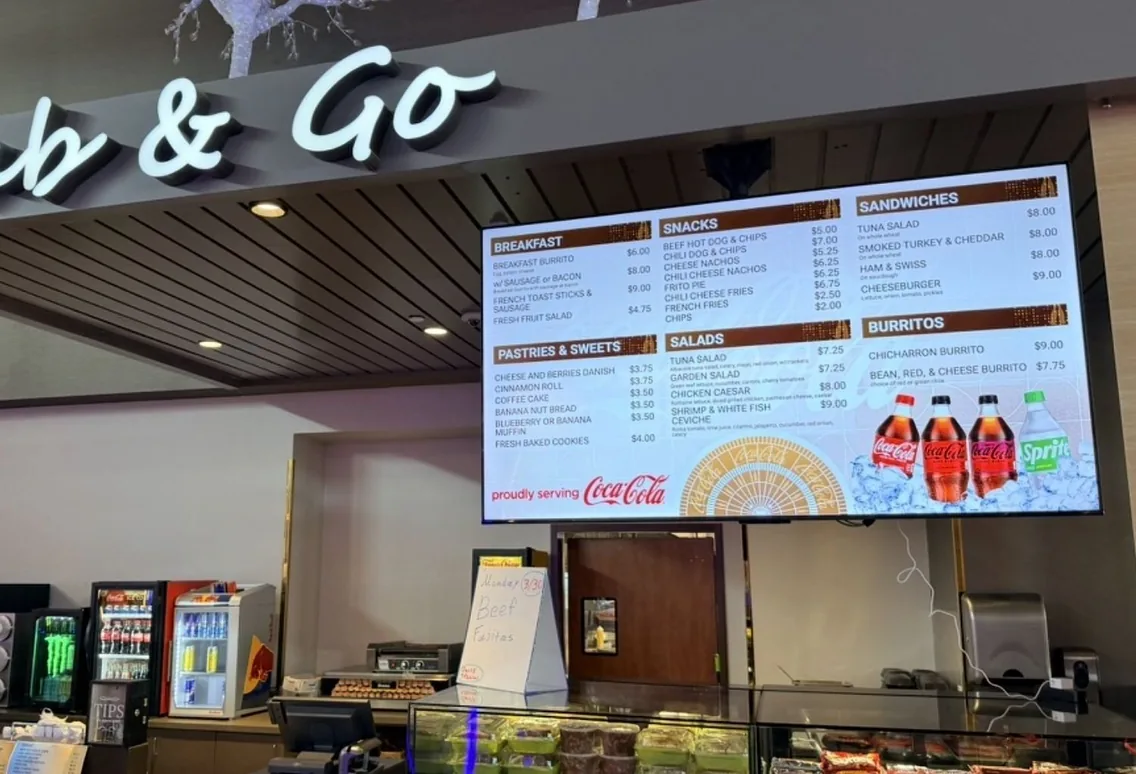
Real install · casino grab & go menu board