
Pitch playbook
What to say, word for word.
The talk tracks, the questions, the demo and the answers to every objection we hear. Say it your way, but keep the facts exactly as written here: they’re the ones we can stand behind.
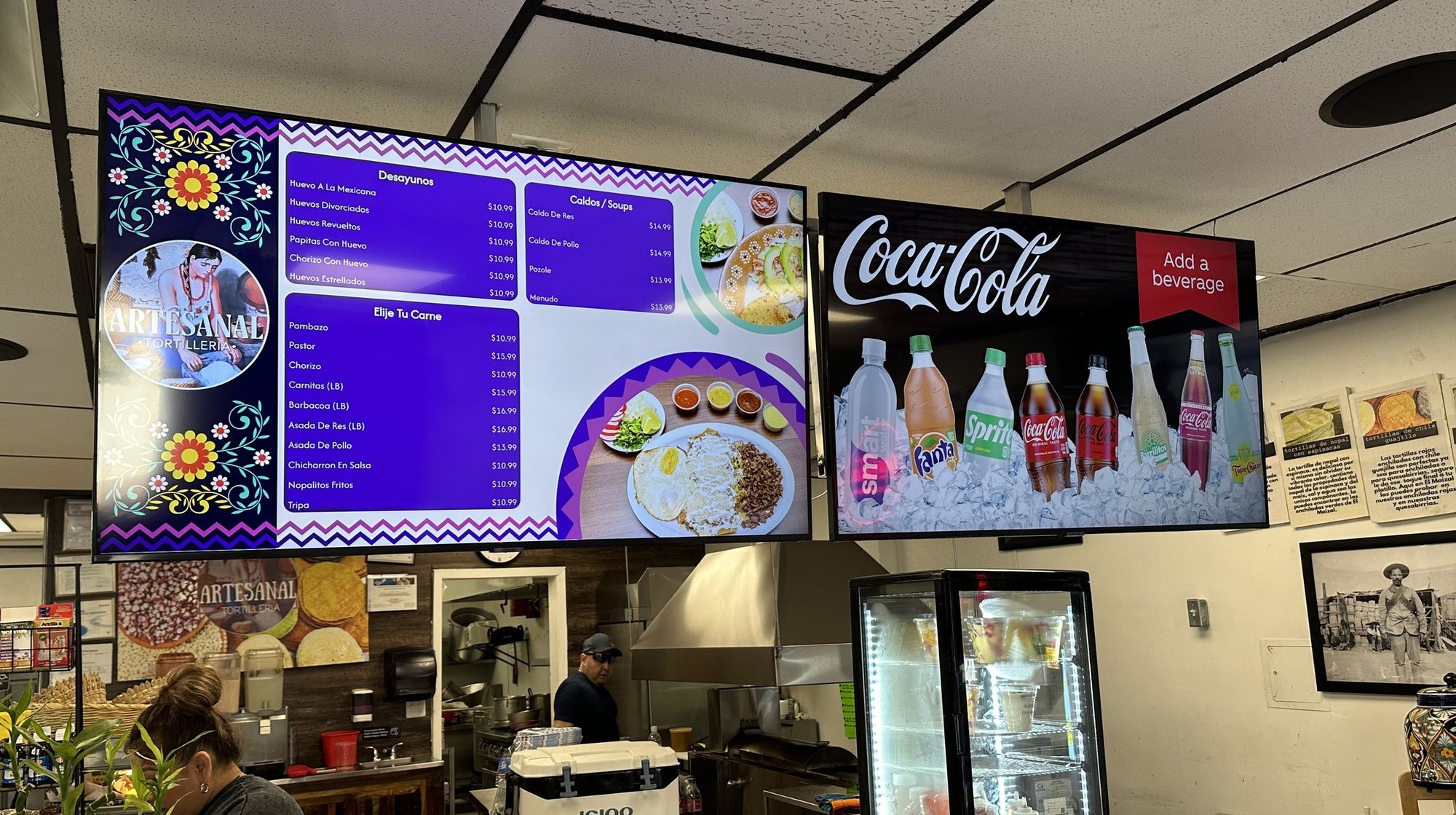
Real install: Artesanal Tortilleria · San Antonio, TX
What you’re selling: their menu, and your drinks right beside it.
1
The 30-second pitch
Open with what you see in their store. Then show, don’t explain. Say your program’s price plainly, and never say “free” unless it’s $0.
“I noticed you’re still changing prices by hand. For accounts like yours, we offer custom digital menu boards at special pricing, and we pay [all / part] of it: the TV boards, a QR menu for your tables and print menus, all from one menu. You change a price on your phone and it’s live everywhere. I set it up. All I need today is a photo of your menu. Can I show you one in a store like yours?”
Swap the opener for what you see.
Openers that fit what you see
- Paper or laminated menus: “I noticed you’re still reprinting your menu when prices change.”
- A whiteboard or chalkboard: “I noticed you’re writing the menu by hand every day.”
- Price stickers or crossed-out items: “I noticed the price stickers on your board.”
- TVs that are off or on a slideshow: “Those TVs up front could be your menu.”
- Already digital: “How much are you paying for those screens?”
Then stop talking and pull up a store like theirs (the Proof section of the Sales Hub, or show mode).
2
The 2-minute pitch
1. The problem (20 seconds)
“Every time a price changes, you reprint, put a sticker on it, or cross it out. Guests notice. And your menu is on your wall, your counter and your tables, so that’s three places to fix.”
2. What they get (40 seconds)
“Just a Menu gives you custom menu boards for your TVs, a QR menu guests scan at the table, and print menus. It’s all one menu. I take a photo of the menu you have today and one of your counter, and the system instantly turns them into boards that match your restaurant, with your items and prices. They’re real designs, not AI art: every price crisp and correct. They’re ready to go, and you can change anything if you ever want to. Our drinks show up in your drinks section with real product photos, and I can build a combo with your best seller.”
3. How they run it (30 seconds)
“After I hand it over, it’s yours. Change a price on your phone, and the TVs, the QR menu and the print files update. Out of something? Mark it sold out and it comes off. You don’t call anybody.”
4. What it costs, and the ask (30 seconds)
“For accounts like yours, we pay [all / part] of it, so your price is [$__] a month. The install takes under 30 minutes and I do it. Can I take a photo of your menu now, and come back with your menu on the boards?”
Say who pays and the price out loud: “We pay [all / part] of it.” It answers “what’s the catch?” before they ask.
3
Discovery questions
Ask these like a conversation, not a form. You’re listening for pain, for fit, and for who decides.
Pain: is there a problem worth fixing?
- How do you change a price today?
- When did you last reprint the menu? What did it cost?
- What happens when you run out of something mid-shift?
- Do you get a line at the counter? When?
Fit: will it work here?
- Do you have TVs up front? How many, and do they have HDMI ports?
- What POS do you use? (Square, Toast, Oracle and Clover sync. Anything else runs side by side.)
- Are you paying for a digital menu, a designer or printing now? How much?
- Are you open all year? (Seasonal accounts switch on and off by date.)
- One location, or more?
Decision: who says yes, and who runs it?
- Who decides on something like this?
- Who changes the menu day to day? (That’s who gets the handover link.)
- What’s the best email and cell for the owner?
Opportunity: what will you build for them?
- What’s your best seller? (That’s the combo, with your drink.)
- Any specials you run by day or time? (Breakfast and lunch can switch on a schedule.)
Ask yourself (not them)
- Is it a Coca-Cola account, or one I want to win?
- What’s in the cooler? Room for another?
- Will I be back in the next two weeks? If not, do it in one visit.
Three pain answers and TVs on the wall: pitch now. No TVs: pitch the QR menu and print menus first.
4
The live demo (about 5 minutes)
Before your first demo, set up a demo restaurant in your own login with a live QR menu, and do this once at your desk. Know how long the menu photo takes to read on a real menu before you rely on it at the counter.
1. Show a store like theirs (1 minute)
Open the Sales Hub’s Proof section or show mode and pick their type.
“This is a pizzeria in Austin. Same kind of counter as yours.”
2. Snap their menu: the wow moment (1 minute)
In JAM: Dashboard → Add Restaurant (their name and address) → Menu Workspace → Upload Menu. Photograph their menu, every page.
“Watch. It reads your menu for you. No typing.”
While it reads, play the demo video or show more installs. When the Imported Menu Preview opens, turn the phone around.
“That’s your menu. Your items, your prices. I’ll check it with you, and next time it’s on your TVs.”
If it’s slow, don’t wait: “I’ll bring this back on your boards next visit.” (That’s the two-visit setup.)
3. The sold-out tap: the aha (1 minute)
Have them scan your demo restaurant’s QR code with their phone. On your phone, in Menu Workspace, switch an item from Available to Sold Out. Ask them to refresh.
“It’s gone. Same on the TVs and the print file. That’s a price change too: one place, everywhere.”
4. The drinks and the combo (1 minute)
Show the Wing Dash Daily Special or the Artesanal drinks board.
“Your drinks go in with real photos. Want a combo like this with your best seller?”
5. The ask (1 minute)
Go to part 6.
Don’t demo the design editor. Their boards come ready to go: editable if they want, never required.
5
Objections, with exact words
In the order reps hear them. Under each answer: why it’s true, for you.
“What’s the catch?”
“Fair question. We pay [all / part] of the cost, so your price is [$__] a month. We do it because we’d rather be your partner than just the delivery truck. And yes, our drinks show up in your drinks section. Your food, your prices and your specials are yours to run.”
Why: say who pays and what they’d pay. If they ask what happens if they stop carrying Coca-Cola, don’t guess: “Good question. Let me find out and come back to you.”
“I don’t have time.”
“That’s why I do the setup. All I need today is a photo of your menu. Next visit I plug in the players; the install takes under 30 minutes. After that, changing a price takes a few taps on your phone.”
Why: you do the setup, and the owner only changes what changes. The rep guide’s own answer: “Your SDM handles setup.”
“I already have a menu board.”
“Keep the wall. Upgrade the board. When a price changes today, what do you do? [Let them answer.] With this, you change it once on your phone and the TVs, the QR menu and the print menu all match.”
“Your printed menu becomes TV boards and a QR menu, and you can still print it.”
If it’s a printed board
“We use Toast.” / “We use Square.” / “We use Clover.” / “We use Oracle.”
“Good. Square connects. Your items, prices and sold-out items update on their own, about every hour, or right away with one tap.”
Square
“Keep it. Just a Menu connects to it: your items, prices and sold-out items reach your boards about every hour, or right away with one tap.”
Toast, Oracle or Clover
“Keep it. This doesn’t replace your POS; it runs your menu boards next to it. You’d change prices in Just a Menu, from your phone.”
Anything else
Why: Square, Toast, Oracle and Clover sync about every hour. Any other POS runs side by side: never say it syncs.
“Who maintains it?”
“You do, from your phone: prices, specials, sold-out. It takes a few taps. I keep access, so if you want a hand, call me. And there’s step-by-step help inside the app.”
Why: you stay in “People with access” after the handover, and Instructions is on every page in JAM.
“I’m not tech-savvy.”
“If you can take a photo with your phone, you can run this. I set it up. You change a price with a few taps, and it changes everywhere. Less work, not more.”
Why: you do the setup; the owner only changes prices, specials and sold-out items.
“I’m already paying for digital menus.”
“How much are you paying now? [Let them answer.] Through our program, your price is [$__] a month. And you change it yourself from your phone instead of calling someone.”
Why: from the “Why Sell JAM?” rep guide. Don’t name their provider or quote its prices.
“We use Canva.”
“You can edit a lot like Canva, but you don’t have to: we build the boards for you, made for your restaurant. It keeps your TV boards, QR menu and print menu in sync. Change it once, it updates everywhere.”
Why: from the “Why Sell JAM?” rep guide.
“I don’t have TVs.”
“Start with the QR menu and print menus: same menu, no hardware. When you’re ready for TVs, any TV with an HDMI port works, with one of our players behind it.”
Why: the QR menu and print menus need no hardware. Who pays for TVs isn’t settled: don’t offer TVs.
“I don’t want ads on my screens.”
“It’s your menu first. Your food and prices are what’s on screen. Our drinks sit in your drinks section, and some slides in the rotation can be drink promotions or a combo with your food.”
Why: Auto Create Playlist and Menu Pulse can put bottler promotions in the rotation. Be straight about it.
“What if the Wi-Fi goes down?”
“The players run on your business Wi-Fi, so we’ll connect them to that, not the guest network. And guests can always open the QR menu on their phones.”
Why: what the TV does with no Wi-Fi isn’t confirmed. Don’t promise the TV stays on.
“My menu is complicated.”
“It reads sizes and prices, small, medium, large, and every page of a PDF. We check it together before anything goes live.”
Sizes, a pizza price grid, lots of pages
Why: the photo import reads sizes and prices, and multi-page PDFs. Nothing goes live until you click Accept Import.
“Can I change the design?”
“You don’t have to: your boards come ready to go, made from your menu. If you ever want to, you can change fonts, colors and photos. Some brand pieces stay locked so the board stays looking right.”
Why: Auto Create Playlist builds the boards (up to four versions, if the owner wants a choice); Designer Lock keeps the brand pieces in place.
“The other brand’s rep says they have something like this.”
“Ask them to show you one on a wall. Here are ours.”
Then open Proof
Why: don’t claim the competitor has nothing; you can’t prove it. Proof beats claims.
“Let me think about it.”
“Sure. Can I take a photo of your menu now? No commitment. Next time I’ll show you your own menu on the boards, and you decide then.”
Why: building it costs the account nothing, and nothing goes live until you activate it.
6
The ask
Always ask for one small, concrete thing. In order:
1. The yes
“Want me to set this up for you?”
2. If they hesitate, the photo
“Can I take a photo of your menu? I’ll come back with it on your boards.”
3. The details
Use the Get set up sheet: the owner’s name, email and cell · the number of TVs · a wide photo of the counter · the business Wi-Fi at install.
4. The date
“I’m back Thursday. Can we plug it in then? It takes under 30 minutes.”
Leave the restaurant sell sheet and the Get set up sheet with your name and number on it. Text the show-mode link the same day.
7
Follow-up texts and emails
Copy, paste, fill the brackets. Keep texts short; send from your own phone.
1. Same day, no yes yet (text)
Hi [Name], it’s [Your name] with Coca-Cola. Thanks for your time today. Here’s what those menu boards look like in other restaurants: justamenu.com/saleshub-demo. Text me a photo of your menu and I’ll bring it back on your own boards. Your price: [$__] a month.
2. Same day, no yes yet (email)
Subject: Your menu on your TVs
Hi [Name],
Thanks for making time today. As promised, here’s how Just a Menu looks in restaurants like yours: justamenu.com/saleshub-demo
The short version: I take a photo of your menu, and you get custom menu boards for your TVs, ready to go, a QR menu for your tables and print menus, all from one menu you change on your phone. We pay [all / part] of the cost, so your price is [$__] a month, and I do the setup.
If you send me a photo of your menu (every page), I’ll bring it back built on your boards so you can see it before you decide.
[Your name]
[Phone]
3. They said yes (text)
Great talking today, [Name]. Next step: I’ll build your boards from your menu photo. I’ll be back [day] to plug in the players; it takes under 30 minutes. Anything on the menu changing before then? Text me.
4. Boards are built (text)
Your new menu boards are ready to look at. When’s a good 30 minutes this week to plug them in?
5. Handover sent (text)
I just sent your Just a Menu link. Open it on your phone to take over your menu. It works for 7 days. Try it: mark one item sold out and watch it come off the menu.
6. Day 3 after install, not signed in yet (text)
Hi [Name], quick check: did the Just a Menu link work? It expires [date]. If you’d rather, I can send a new one.
7. Day 30 (text): the reason to come back
Hi [Name], want a new special on your boards this month? I can set up a combo with your best seller and a cold drink next time I’m in.
The handover link expires after 7 days. Put the day-3 text in your calendar when you send it.
8
After the install: keep the account
- Every visit, check the boards. Anything sold out that’s back? A price that’s off? Fix it with them.
- Bring something new every month. A combo with their best seller, a seasonal special, a breakfast board on a schedule.
- On Square? Open Beverage Analytics for that account and bring one number to your next visit: how much more a check is worth when it includes a drink.
- New packaging? Your brand team updates it once, and the boards that show it update without a visit.
- Got a story? A flipped account, a new cooler, an owner who loves it: send it to sales@justamenu.com.
“JAM gives you legitimate reasons to revisit. They start to see you as someone helping them run their business.”
From the “Why Sell JAM?” rep guide